


















Skip to content
Claude AI training workshop

Claude Training for Teams

Hands-on Claude training for teams that live in long documents and care about the quality of what they write.

  • Half-day session
  • In person or remote
  • 88% would recommend

10,000+ people trained across 500+ organisations

BT
Hilton
Three
Julius Bär
Quilter
Network Rail
Estee Lauder
WeWork
The AA
Bupa
London Business School
Kimberly-Clark
Frontier Economics
Candy Kittens
Amdocs
Young's Brewery
make.com
Dock & Bay
London & Partners
Montagu
BT
Hilton
Three
Julius Bär
Quilter
Network Rail
Estee Lauder
WeWork
The AA
Bupa
London Business School
Kimberly-Clark
Frontier Economics
Candy Kittens
Amdocs
Young's Brewery
make.com
Dock & Bay
London & Partners
Montagu

Bespoke Claude training, built to stick

Our Mastering Claude Programme is a hands-on, bespoke half-day workshop that gives your team the knowledge, confidence and skills to use AI well in their day-to-day roles. It runs on Claude and is tailored to your team’s real tasks and data, so people leave ready to apply what they’ve learned immediately.

Claude has become the assistant of choice for teams whose work depends on careful reading, careful writing and long, dense source material. We build every session around the reports you read, the papers you write and the decisions that hang on getting the detail right.

What people said after the class

98%

said the class will help them get more value from Claude at work

99%

enjoyed the class

88%

would recommend it to a colleague

5.4 hrs

average time each person expects to save every week

Post-class surveys from 411 attendees across 52 Claude classes.

…both instructors were clearly very knowledgeable and prepared and I came away from it with some genuinely actionable skills
Private equity firm
Best training I’ve done in a while. Very practical. Well done
Deal team, private equity firm
I was an AI newbie and I understood what was going on the whole time…
People team, consumer technology company

What your team walks away knowing

Every session is built from scratch around your work, but every session builds the same foundations.

01

Where Claude fits careful work

The AI trends shaping your industry and role, and where Claude earns its place in careful, detailed work built on long source material.

02

Knowing when to trust it

How large language models work, so people know when the output can be relied on and when it needs checking against the source.

03

Preferences, Memory and Incognito Chats

Setting Preferences and using project-scoped Memory so Claude works the way your team does, with Incognito Chats for the matters that should leave no trace.

04

Prompting across dense material

Prompt engineering aimed at real business problems, worked through your long, dense documents, and turning on Adaptive Thinking, formerly Extended Thinking, when a problem needs Claude to reason slowly.

05

Research Mode, data and analysis

Analysing data, market trends and news with Research Mode, and working through numbers with the Excel plugin, from a first read to a structured output you can use.

06

Artifacts, Projects and Claude Design

Building Artifacts, setting up Projects that hold the context behind ongoing work, designing visual work with Claude Design, and connecting your own tools through MCP connectors.

07

Skills and Cowork

Turning your team’s voice into a tone-of-voice Skill anyone can call up, packaging repeatable work into Skills, and using Cowork to turn a finished piece of analysis into a deck in your own PowerPoint template.

08

Choosing the right model

Running the same task on Sonnet, Opus and Fable side by side, so you can see for yourself how to match speed, depth and cost to the task in front of you.

09

Safe and compliant use

Using Claude safely and ethically, covering bias, privacy and what the EU AI Act means for your team.

The capstone

Everyone finishes the session by packaging their work into a reusable Skill or a piece of Claude Design, so people leave with something their whole team can use, not just notes.

Ready to get more from Claude?

We can usually map your highest-impact use cases in a single conversation.

Get in Touch

The habits we drill until they stick

We work each one through your team’s real tasks, so people leave with repeatable ways of working rather than tricks they saw once.

Get the model to interview you first

Have it draw out the detail it needs before it answers, then saves what it learns about you as a memory for next time.

Ground every answer in your own sources

Anchoring the model in your own source material to cut hallucination, by working inside a Project that searches your connected sources before the web.

Stress-test your thinking with an adversarial review

Turning the model into a reviewer that argues the other side in a fork of the chat, so your original work stays clean for the next step.

Clone your house style from real samples

Building a tone-of-voice guide from your real writing and saving the result as a Skill anyone on the team can call up with a slash.

Make the model critique and rewrite its own drafts

Having it critique its own draft and then rewrite it in the same chat, so quality climbs without you doing the editing.

Check answers for consistency before trusting them

Asking the same question of two documents three times using parallel Cowork sub-agents, so each run is genuinely independent.

Separate planning from execution

Making the model plan what the analysis should show first, then letting it run the analysis and build a dashboard from your data.

Debate decisions from multiple perspectives

Convening a panel of personas to debate a decision in a new chat, with each persona given a believable background and position.

Built in our workshops

Our workshops are hands-on. People do not just learn features, they leave with working tools they have built around their own tasks. Here is a selection of what teams have built with us.

Grounded policy knowledge base Q&A

Answers questions grounded in policy publications and stakeholder materials, cites its sources and flags uncertainty.

Compliance manual Q&A agent

Gives natural-language answers grounded in the firm’s own compliance manual.

Internal legal counsel rehearsal agent

Simulates a staff member raising a compliance query so officers can rehearse their guidance, a pattern that recurred across three workshops.

Scheduled regulatory change monitoring digest

Runs automated searches for regulatory and sanctions developments and delivers them as a structured digest.

Drawn from our anonymised client use case library.

The numbers behind the shift

Three signals showing how fast teams and enterprises are standardising on Claude. Each links to its primary source.

$65bn

Anthropic’s annualised revenue run-rate at the end of July 2026, up from $9bn at the end of 2025

TechCrunch

$965bn

Anthropic valuation after its $65bn Series H in May 2026

TechCrunch

300k+

business customers using Claude by late 2025, up from around 1,000 two years earlier

Forbes

How we build your bespoke workshop

Every programme follows the same eight steps, from a pre-workshop survey through to optional ongoing support, so the session is tailored to your team and you can see what it delivered.

  1. 01

    AI Opportunities Survey

    Every attendee completes a short pre-workshop survey on how they use AI now and where they want to, so we start from real behaviour rather than assumptions.

  2. 02

    Customisation Call

    A one-hour call where we present the survey results and tailor the workshop material to your team’s tasks and priorities.

  3. 03

    Building Tailored Exercises

    We spend half a day building exercises around your real workflows, so the practice on the day maps to the work your team actually does.

  4. 04

    Workshop Delivery

    The half-day hands-on workshop itself, delivered in person at your offices by default, or remotely if that suits your team better.

  5. 05

    Impact Survey

    A follow-up survey to measure confidence, adoption and the time your team is saving after the training.

  6. 06

    Training Impact Report

    A report showing the use cases your team developed, the time saved, the ROI and how confidence levels shifted.

  7. 07

    Review Call

    A follow-up call to go through the results together and agree the next steps.

  8. 08

    Ongoing Support

    An optional resurvey at three or six months to check adoption is sticking and see what support you need next.

What’s included

Delivered in person at your offices, or remotely.

  • Full content tailoring to your team’s tasks
  • The pre-workshop AI Opportunities Survey
  • A one-hour customisation call and half a day of bespoke exercise preparation
  • The half-day workshop itself
  • A post-training impact survey and Training Impact Report
  • A follow-up review call
  • 12 months access to class resources and prompts via our online learning platform
  • Tailored update emails as new features are released for Claude

Case study: Spotless Brands

Mastering Claude for the cross-functional AI team

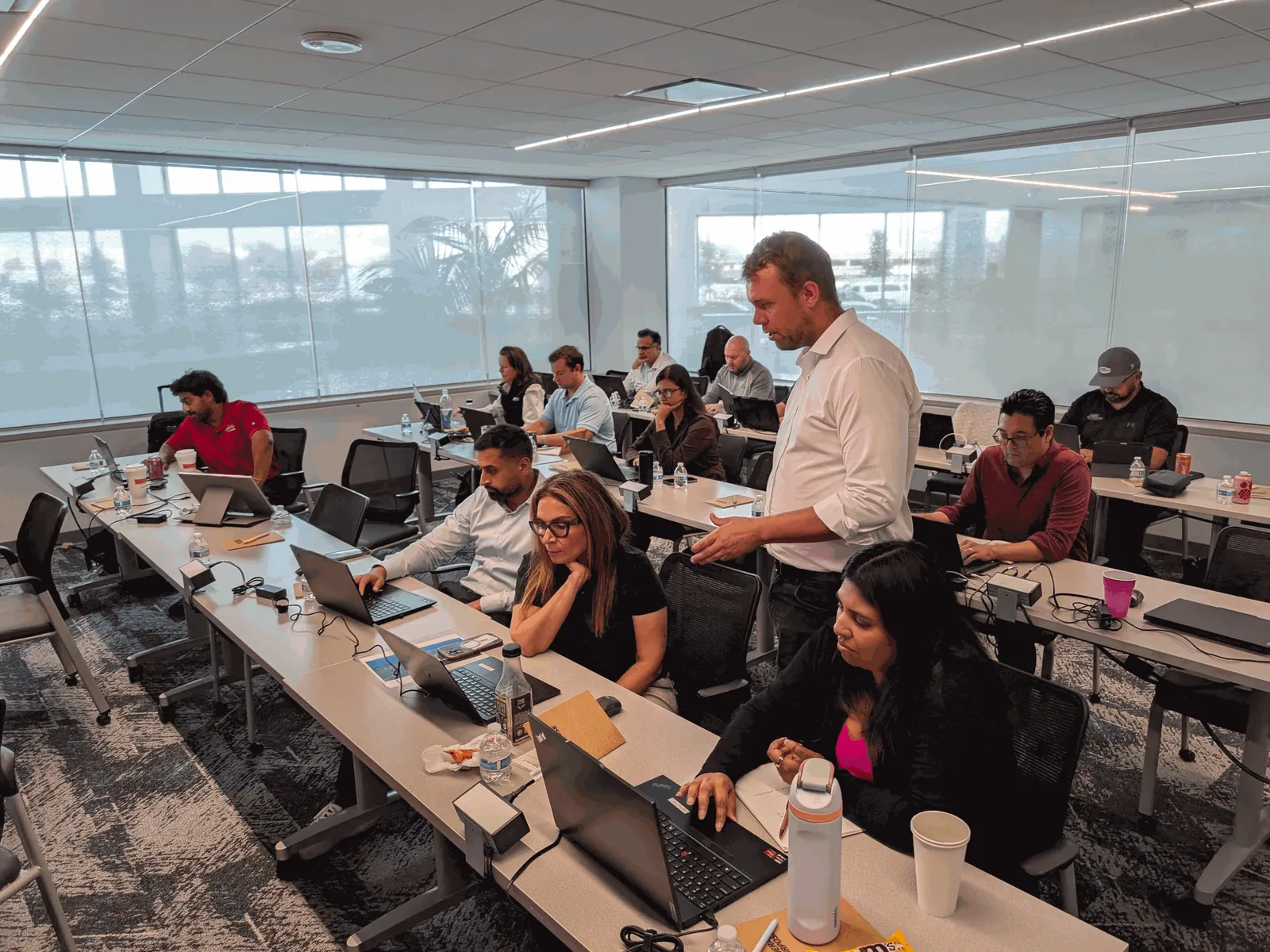
Spotless Brands, a car wash operator with more than 220 locations across 13 US states, brought its cross-functional AI team together for a one-day Mastering Claude workshop at its headquarters near Chicago.

+8 hrs
expected time saved per person each week
94%
positive about AI's impact on their career, up from 83%
Spotless Brands AI training
“This session had everything you need to get started using AI in an impactful way. We had a range of different people in the room and they all left with a number of new ideas and techniques.”

Daniel Wardle

Founder, Rampart

Going further

Ready for Advanced Claude and Cowork?

For teams who already use Claude every day, our advanced session moves on to Cowork and Claude Code: handing over multi-step work, checking it with sub-agents and building Skills the whole team can rely on.

  • Claude working directly on your files, with a CLAUDE.md that remembers your rules
  • Scheduled monitors that report only what changed
  • Running independent checks in parallel with sub-agents
  • Writing your own quality tests and turning them into review Skills
  • Dashboards built on written-down rules, so errors are flagged rather than guessed

Who it’s for

Analysis and writing teams

Teams whose output is judged on the quality of their analysis and their writing.

Advisers in dense material

Consultants, lawyers, economists and advisers who work with dense source material every day.

Leaders wanting consistency

Leaders who want consistent, high-standard AI use across a team, not just pockets of it.

Ready to go further

Anyone who has used Claude for quick tasks and wants to go much further.

Who teaches it

Every Claude session is led by one of our instructors, with a dedicated tutor in the room so nobody gets left behind.

Tom Hewitson

Tom Hewitson

Founder + Chief AI Officer

Susi Castle

Susi Castle

AI Instructor

Meena Sangar

Meena Sangar

AI Instructor

Charlie Cadbury

Charlie Cadbury

AI Instructor

Gerhild Pirker

Gerhild Pirker

AI Instructor

Louis Whittal

Louis Whittal

AI Instructor

Cien Solon

Cien Solon

AI Instructor

Aaron Jones

Aaron Jones

AI Instructor

Frequently asked questions

Why train on Claude specifically?

Claude is particularly strong with long documents and careful writing, which is why many of the teams we work with have adopted it. We tailor the session to the version and plan your firm actually uses.

Can you train us on Claude Projects?

Yes. Setting up Projects so Claude holds the context behind a piece of ongoing work is one of the most useful things we cover, and we build examples around your real work.

Do you cover Artifacts, Skills and Cowork?

Yes. We cover Artifacts and Claude Design for building things you can see and use, Skills for capturing your team’s voice and packaging repeatable work, and Cowork for turning finished analysis into documents and decks. Everyone finishes the session by turning what they built into a reusable Skill or a piece of Claude Design.

Should our team use Claude or ChatGPT?

It depends on what your organisation has licensed and the work involved, and many teams use both. Claude is especially strong on long documents and careful writing. We train on whichever you have, and can run sessions that cover both.

We have Claude licences going unused. Can you help?

Yes, and it is one of the most common reasons teams come to us. We build the session around the work people do every day, so they leave with tasks they can hand to Claude the next morning, and our impact survey shows you how usage changes.

Is Claude training suitable for beginners?

Yes. Sessions work for people who have barely opened Claude as well as regular users, and the tutor in the room gives extra help to anyone who needs it.

Do people need technical skills?

No. The core course is for knowledge workers and needs no coding. Teams who want to build their own tools can go on to our Claude Code for Non-Developers course.

Is the training delivered in person or remotely?

In person at your offices by default, with an instructor and a dedicated tutor in the room. We can also run it remotely when that suits your team better. Every course runs as a single half-day session.

Do we need technical experience to get value from Claude training?

No. We build every session around the way your team already works, so people start with their own tasks and documents rather than abstract theory. Complete beginners and confident users get value from the same room.

How do you measure the impact of the training?

Every attendee completes an AI Opportunities Survey before the workshop and a follow-up impact survey afterwards. You then get a Training Impact Report showing the use cases your team developed, the time saved, the ROI and how confidence levels shifted. We can also run an optional resurvey at three or six months to check adoption is sticking.

Do you run Claude training courses in London?

Yes. We are based in Covent Garden, London, and run most sessions in person at clients’ offices in London and across the UK. We also work with teams worldwide, from Paris and Berlin to New York and Singapore, and can run sessions remotely when that suits better.

See what this looks like for your team

Tell us how your team works and we will design a bespoke Claude programme around your actual documents, tools and tasks.

Get in Touch